
Will your booking app's website get you found on Google?
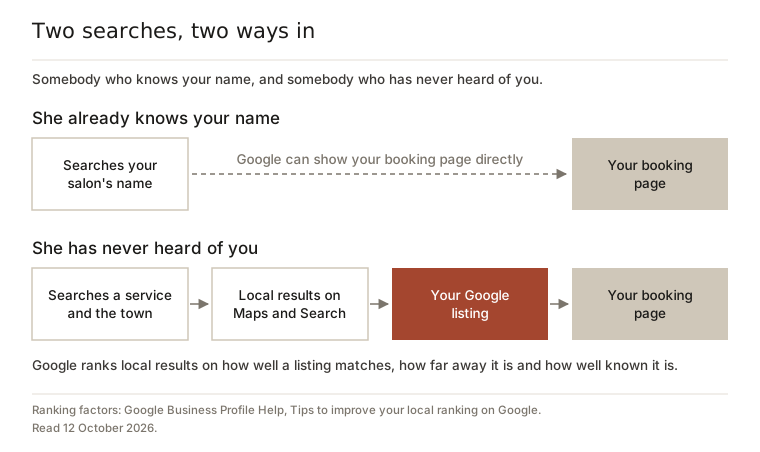
Short answer: it helps the people who already know your name, and not many others. If someone types your salon’s name into Google, the page your booking app made for you will often come up, and that is worth having. But when someone who has never heard of you looks for a hairdresser near her, Google shows her local results on Maps and Search, and those are built from Google Business Profiles, not booking pages. Your booking page is where she books once she has found you. Your free Google listing is how she finds you. So sort the listing out before you pay for a bigger plan or a new website.
This came up on r/hairstylist in September. A stylist still building her client list was weighing up her booking app’s paid upgrade against a Squarespace site, and asked the people already using it whether it was bringing in the marketing they wanted. It is a fair question, and the pages that answer it on Google are almost all written by the companies selling the upgrade.
What the booking apps say, and what Google says
Booking apps are confident about this. GlossGenius, the app in that thread, says in its own help centre: “We’ve already done a lot of the work to ensure your GlossGenius booking site shows up in Google searches.” Booksy’s UK home page says that when people search for things like “barber near me”, your Booksy profile “is structured to rank right at the top”.
Google’s own help page on local ranking, read today, puts it differently. It says local results are mainly based on three things: how well a Business Profile matches the search, how far away the business is, and how well known it is. Every tip it gives for doing better is something you do on your Business Profile: verify it, keep your hours and details complete, reply to reviews, add photos. And it says plainly: “There’s no way to request or pay for a better local ranking on Google.”
Even the apps send you there in the end. Booksy’s help centre calls a Google Business Profile “a must-have” for a service business. GlossGenius needs you to have one before it can put a Book button on Google for you.
Three checks to do on your phone tonight
- Search your own name and town. Your booking page should be somewhere near the top, next to your Google listing if you have one. If it is not there at all, GlossGenius’s help centre says a new site, or one whose address has just changed, can take a while to be found.
- Search like a stranger. Type the service you most want to sell and your town, such as “balayage” and the town, or “hairdresser near me” while you are standing in the salon. Look at the map and the listings that come with it. Are you there? Where is your booking page? If a booking app’s page does come up, look at whose page it is. A list of every salon in town on the app’s own site is the app being found, not you.
- Open your own listing. If you found it, tap it. Are the hours right? Are your services, photos and recent reviews there? Is there a Book button, and where does it go?
If the second search did not show you at all, read why your salon does not show up on Google Maps next. If you rent a chair and the listing itself is the hard part, start with getting a Google listing when you rent a chair.
The address belongs to the app
Look at the address of your booking page. On GlossGenius it is your name followed by .glossgenius.com, and its help centre says you can only change the part before the dot: “Custom domains are not supported at this time.” Booksy profiles live on booksy.com. The ones shown on Booksy’s own UK home page have addresses made of a number, the business name, the type of business, another number and the town. A Fresha page lives on fresha.com, which is why some salons find a Fresha page they never signed up for.
None of that is sinister. It just means the page is rented, not owned. If you change booking app, the page stays with the old app, and whatever Google had learned about that address stays with it. GlossGenius’s own help centre warns that even changing your address inside its app means Google may keep pointing at the old one until it looks again.
Your Google listing is different. It is verified under your own Google account, and it does not care which diary you use. Switch from one app to another and the listing, the reviews left on Google and your photos all stay where they are. That makes it the one thing here worth putting real effort into.
None of this is a reason to leave your booking app. It is a reason not to pay extra for its website on the promise that it will become your shopfront on Google.
Joining the booking page to the listing
The two work best together. Fresha, Booksy and GlossGenius all say they can put a Book button on your Google listing through Google’s own booking feature, Reserve with Google. Someone finds you on the map, taps Book, and lands in your diary. Each app has its own rules, and they are fussier than you would expect:
- GlossGenius offers it on its Gold and Platinum plans only. The name and address on your Google listing must match the ones in your GlossGenius account.
- Booksy needs search visibility switched on, so your business appears in its marketplace. You need at least one active staff member with a service assigned, and your name, phone number and address in Booksy must exactly match your Google listing.
If the button is missing, a mismatch in your name or address is the first thing to check. What each app charges when someone books through that button is a separate question with different answers, covered in who gets paid when someone books from your Google listing.
Before you pay for any website
Do it in this order. The first four cost nothing.
- Claim and verify your Google listing. Google says verifying tells it you are allowed to represent the business, which makes the listing more likely to show up.
- Fill it in properly. The right category, your real hours, your address if clients come to you, and photos of your actual work.
- Ask for reviews and reply to them. Google names the number of reviews as part of how well known a business is.
- Switch on the Book button through your booking app, if your plan includes it, and check the details match.
- Then decide about a website, for the things a website is good for: an address you own, a portfolio, somewhere to send people that does not change when your app does. Not because a plan upgrade promises Google.
Plenty of salons will find the free steps are enough, and that is a fine answer. In September a developer posted on r/smallbusinessuk that he had built sample websites for a few local salons, to save them Treatwell fees, and none of them were interested. Most salon owners do not want another website to look after, and you do not need one to be found.
Where we come in
Salon Ads Studio runs Google Ads for salons, barbers and chair renters, and every account starts with us fixing the Google listing, free, before we take a card. We do not sell websites. If you advertise with us, we build one simple page for the ads to land on, and why we do that has its own explanation.
If you just want to know where your listing stands, sign up free and we check it for you, with no card on file. And the free assessment on our homepage works out what your quiet days cost you in a year, with no account and no card.
Questions people ask
Should I paste my booking link into the website box on my Google listing?
Check your app's rules first. GlossGenius's help centre says not to add its booking link to your Google Business Profile by hand if you want its Book Online button, because the button will not appear if you do. Other apps handle this differently, so read your own app's Reserve with Google page before you paste anything in.
Can I point my own domain name at my booking page?
Usually, yes. GlossGenius does not support custom domains, but it publishes a guide to forwarding a domain you already own to your booking page, set up through your domain provider. That gives you an address that survives a change of app, which is handy for business cards and your Instagram bio. On its own it will not move you up the map.
Does linking my booking page from Instagram help it show up on Google?
It helps Google find the page. GlossGenius's help centre suggests linking your social media profiles to your booking site for exactly that reason. Being found by Google is not the same as being shown to a stranger searching near you, though, and that is still mostly your Google listing's job.
How long does the Book button take to appear on Google once I switch it on?
Allow a few days. GlossGenius says changes can take 48 hours to show on Google, and that its link with Google updates your availability every 24 hours. Booksy says its Reserve with Google status can show as Inactive until 72 hours have passed since you last updated your Booksy profile or your Google listing.
