
Can you get a Google listing when you rent a chair?

Yes, usually. The rule that stops most chair renters is not the one they think it is. Google does not say the address on a Business Profile has to belong to you. It says a business has to make in-person contact with customers during its stated hours, and it rules out an ongoing service at a location you do not own or have the authority to represent. Those last six words are the whole thing. If the salon owner is happy for you to be listed there, you are past the rule everybody quotes at each other. What actually stops people is the verification video.
What Google’s rules say about somebody else’s address
Google’s business eligibility page is short about who qualifies. A business has to make in-person contact with customers during its stated hours. You do that all day.
The same page lists who is not eligible, and this is the line that gets pasted into Facebook groups: an ongoing service, class, or meeting at a location that you don’t own or have the authority to represent. Read the second half again. Not own. Own or have the authority to represent. A stylist renting a chair with her landlord’s blessing is in a completely different position to someone who quietly set up a listing at a salon that has never heard of her.
The guidelines for representing your business go further. The general rule is one profile per location, and then the exception, in Google’s own words: individual practitioners and departments within businesses may have separate pages.
An individual practitioner, Google says, is a public-facing professional, typically with their own customer base. The examples it gives are doctors, dentists, lawyers, financial planners and insurance or estate agents, so a self-employed stylist is not named. But the test is written out, and it is one you can apply yourself: you operate in a public-facing role, and you can be contacted directly at the verified location during your stated hours. Support staff, Google says, should not create their own profiles. Someone with her own column, her own number and her own clients is not support staff.
Where several public-facing practitioners work at one location, Google is specific about how it should look: the organisation has its own profile, separate from the practitioner’s, and the practitioner’s profile is titled with only her name, not the organisation’s.
Two businesses listed at one address is something Google describes, then. It is not a loophole you are sneaking through.
The step that actually decides it
Verification is where this is won or lost, and you do not get to choose how. Google says verification methods are automatically determined and cannot be changed, and that what you are offered depends on your business type, your public information, your region and your hours. Where video verification is available, Google recommends using it.
The video has rules worth reading before you start recording. It has to be live, unedited, all in one go, at least 30 seconds, filmed and uploaded on a phone through the Business Profile itself. Pre-recorded footage is not allowed. And it must not show other people’s faces, which is not a small detail when you are filming inside somebody else’s working salon on a Tuesday afternoon.
For a business showing a storefront address, the video has three jobs:
- Show where you are. Street signs, building numbers, the shops either side.
- Show the business exists. Your business name clearly printed on a permanent fixture, a signboard, a wall or a window, and the name has to match the one on the profile.
- Show you manage it. Something only someone who works there can reach: a till, a stock room, the payment system.
Google reviews it in up to five business days. When a video is turned down it tells you why, and two of its own listed examples are business name not visible on storefront, and missing proof of authorisation to operate the business.
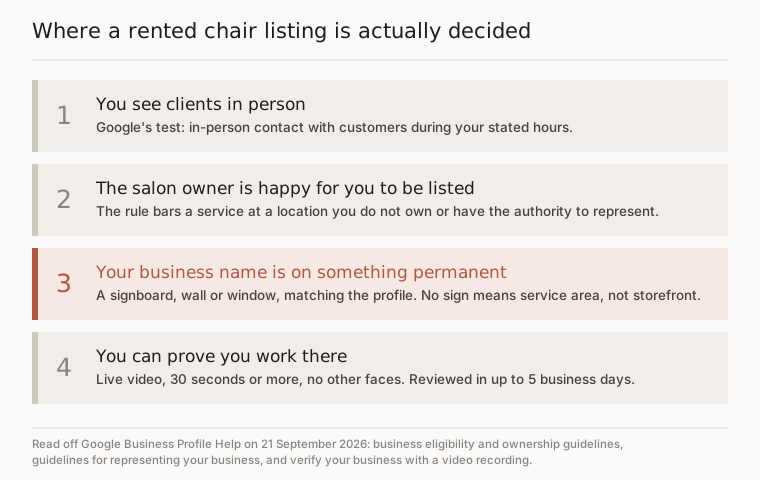
That is the gate. Not the address, and not the rent agreement. A sign with your name on it, and something that proves you belong behind that chair.

If there is no sign with your name on it
Google answers this in one sentence on its own video page: if your business doesn’t have permanent on-site signage, list it as a service-area business instead of storefront. The representation guidelines say the same thing from the other end, that businesses showing their address should maintain permanent fixed signage of their business name at that address.
So there are two honest routes, and one that will cost you the profile.
The first is to get a sign. It is a smaller ask than it sounds: a permanent fixture with your business name at the premises, not a poster that comes down after Christmas. Plenty of salon owners will say yes to a small plate by the door or vinyl on the window, because a second name on the glass makes a shop look busier rather than smaller.
The second is to list as a service-area business, hide the address and set the area you cover. Google’s outer limit there is that the area should not stretch farther than about two hours of driving from where the business is based, which no hairdresser is going to trouble.
The third, the one to avoid, is calling yourself a service-area business while your clients are still coming to the chair. Google defines a service-area business as one that goes to customers and does not serve them at its business address, and it says plainly that if you do not serve customers at your business location, you should not add that address at all. Fudging it is how a profile ends up suspended six months later, usually in the week you needed it most.
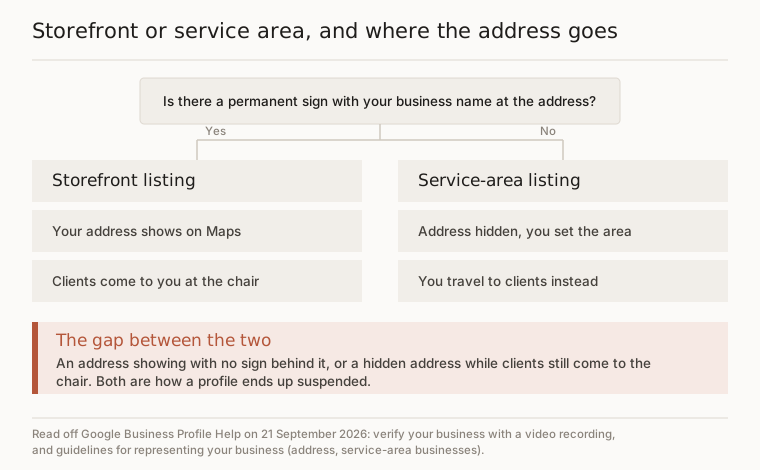
The nearest thing Google publishes to your exact situation is its co-working rule: a business cannot list an office in a shared workspace unless that office has clear signage, receives customers during business hours, and is staffed during business hours by its own people. Signage, customers, staffed by you. A rented chair can genuinely meet all three, which is more than most desks manage.

What to ask the salon owner for
None of the above works without a five-minute conversation, so have it before you type anything into Google.
- Permission to be listed at the address, ideally in an email or a message so it exists somewhere. That is the authority-to-represent half of the eligibility rule.
- Somewhere permanent for your name. A plate, a window decal, a framed board by the door, with your business name exactly as you intend to list it.
- Agreement on your hours. The hours on your listing are the hours you are in that building and can answer, not the salon’s opening times.
- The nod to film for thirty seconds. A quiet part of the day, nobody else in shot.
If the answer is no to all four, you are not getting listed at that address, and the useful thing to know is that this is a landlord problem rather than a Google problem.

Your name on the listing, not theirs
Google refuses business names that explain where a business sits inside another one. It calls this containment information, and its own examples are Chase ATM in Duane Reade and Geek Squad inside Best Buy. The one closest to our trade is Benefit Brow Bar with a department store name tacked on the end: not allowed, and the acceptable version is just Benefit Brow Bar.
So your listing is your own name. Not your name at Marcelle’s, not your name inside Marcelle’s Salon, however badly you want people to find the right door.
There is one exception and it runs the other way. If you are the only public-facing practitioner at a branded location, Google would rather you shared a single profile with the business, named as the company name followed by yours, its own example being Allstate: Joe Miller. A one-chair studio inside a shop with no other stylist is that case, and it is worth knowing before you go to war over a separate profile you may not be entitled to.
Categories work on the same logic. Google tells you not to use categories that belong to an entity containing your business. The salon is the hair salon. If what you actually do is colour, or extensions, or barbering, pick the category that describes you and leave the shop its own.
Before you pay anyone for ads
Adding or claiming a profile costs nothing. Google says so on its own page, and it stays that way: no fee, no commission, and no listing package worth buying from whoever rings you about it.
Get that part right first. An advert pointing at a business Google cannot confirm exists is money going out of the door ahead of the work, while a verified listing with your name, your number and your hours does a job every day without being topped up. If yours is not showing at all, there is a longer piece here on why a salon does not show up on Google Maps that walks the four checks in order.
When the listing is straight and the chair is still quiet midweek, that is the point where paying for searches starts to earn its place: people typing balayage and the name of your town at nine at night, who have never heard of the salon whose name is over the door. We fix the free listing before we take a card, and if you would rather do that part yourself, the pages above are all you need.
Questions people ask
Does a Google Business Profile cost anything to set up?
No. Google's own help page says you can add or claim your business at no charge, and there is no fee to keep it. The cost is your time: a Google account, your details entered properly, and whichever verification step Google decides to offer you.
What if the only verification Google offers me is a postcard?
Then wait it out. Google says most codes arrive within 14 days and expire after 30. While you wait, do not edit your business name, address or category, because that stops the posted code working, and do not request a second code, because Google cancels the first one.
Can I put the salon's phone number on my listing?
Better not to. Google asks for a number that connects to your own business and is under the direct control of that business. A shared reception line is neither, and it is already on the salon's own profile. Use the mobile your clients ring now.
I work in two salons on different days. Can I list both?
Google's practitioner guidance assumes one verified location where you can be contacted during your stated hours, and it does not spell this case out. The safer reading is one profile, at the place whose hours you can publish honestly. Ask in Google's own business community before adding a second.
What happens to the listing if I move to a different salon?
It goes with you, because the profile sits in your Google account rather than the salon's. Change the address, and expect to verify again: Google says updated business details can trigger re-verification. Do not leave the old address showing while you sort it out.
