
Should you fix your Google listing before you pay for ads?
Yes, fix the listing first. Not because SEO beats Google Ads, but because for a salon the SEO that matters is not blog posts or a website rebuild. It is your free Google Business Profile, the listing that comes up on the map when someone nearby types hairdresser into their phone. It costs nothing, nobody can sell you a better place on it, and the ads you pay for later lean on it. So this is not really a choice between two things. The listing is the free half of the same decision, and it goes first because it is free.
What SEO actually means for a salon
When a web agency says SEO, it usually means your website: pages, words, links, months of work. Some of that helps. But a woman after a cut this week is mostly not reading websites. Google’s own help page on local ranking, read today, starts with exactly her: when someone searches for a business near where they are, “they’ll find local results on Google Maps and Search.”
Those local results run off your Business Profile. Google says they are “mainly based on relevance, distance and popularity”, and the same page then heads that third factor Prominence, meaning how well known a business is, partly judged by how many reviews you have. It also says businesses with complete and accurate information are more likely to show up, and that if your information is wrong, your profile might not show for relevant searches in your area.
Then the line that settles this question: “There’s no way to request or pay for a better local ranking on Google.” Google’s UK page for the product calls it a free Business Profile. So the map places cannot be bought, by you or by anyone selling you something. The only way in is the listing, and the listing is free. If yours is missing from the map altogether, that is a different problem, and our piece on why a salon does not show up on Google Maps works through it.
Why the ads lean on your listing
This is the part most “SEO or ads?” answers skip. A salon ad on Google can carry what Google calls a location asset: your address, how far away you are, a Call button. Google’s page on location assets, read today, says that on a phone an ad with one may show the distance to you, a clickable Call button and a tappable details page “with information such as hours, phone number, photos and directions”.
Where does that come from? The same page: “Data for location assets used in Google Ads is sourced directly from Google Maps and Google Business Profile.” To correct an address or a phone number, Google sends you to Maps, not to the ad.
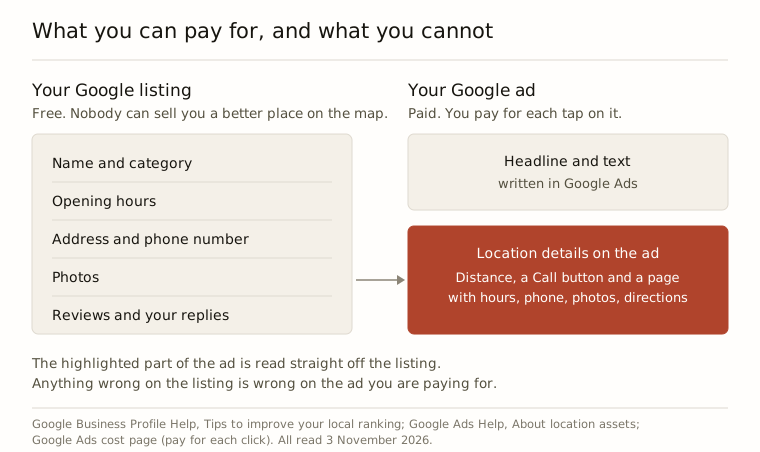
So wrong hours on your listing are wrong hours on your ad. Three-year-old photos on your listing are the photos a paid tap opens. The listing is not a separate job from advertising. It is half of every ad you will ever run.
What a weak listing does to a small budget
Google Ads charges by the tap. Google’s own UK cost page puts it plainly: cost-per-click bidding “means you pay for each click on your ads.” Whether she then rings, books or closes the app, the tap is paid for.
Put made-up round numbers on it. Say you spend £150 a month and taps cost £1.50 each. That is 100 people a month who wanted to know more about you, and you have paid for every one of them. Some will look at your details page before they ring. If that page shows Sunday hours you stopped doing, no reply to a two-star review and the old shop sign, you have paid £1.50 to show her a reason to go elsewhere.
We cannot tell you how many of the 100 that is, and nobody honest can. What we can say is that the fix is free and the taps are not. On a large budget that leak is a rounding error. On £150 a month it is a real share of the money, which is why our piece on £100 a month spends so long on not wasting taps.
The free fixes, in the order we would do them
Google’s local ranking page lists what it wants, and it reads like an afternoon rather than a project:
- Verify the listing. Google says this tells it you are authorised to represent the business, so it is more likely to show up in search results. If verification was never finished, nothing else on this list matters yet.
- Get the category right. It is how Google learns what kind of business you are. Hair salon, barber shop, whichever is true.
- Hours, including special opening hours. Bank holidays, the late night you added, the Monday you dropped. These are the hours your ad will carry.
- Your full address, if clients come to you. If you rent a chair in someone else’s salon this one is genuinely complicated, and we went through it in a Google listing when you rent a chair.
- Photos and videos. Google’s page invites them to show what you offer. The shopfront as it looks now, the inside, your work.
- Reply to reviews. Google says replying shows you value the feedback, that positive reviews and helpful replies can help you stand out, and that more reviews and positive ratings can help your local ranking. Replying to the old ones takes ten minutes.

When to switch the ads on
Once those six are done. Not when you have fifty reviews: reviews grow at the speed of your clients, and an ad can bring new ones in while they do. The listing does not have to be perfect before you advertise. It has to be verified, accurate and not embarrassing, because from that point on you are paying for people to look at it.
Two cases where the answer is the listing and no ads at all. If you are fully booked for the next month, an ad fills a diary you cannot fit. And under about £100 a month of ad spend, we would tell you not to bother yet. Either way the listing is still worth the afternoon, because it is the one part of Google that keeps working whether you pay or not, which is the same point our piece on stopping the ads ends on.
If you would rather not do either yourself
That is what we sell: Google Ads for hair salons, barbershops and chair renters, built and run without you, and the listing comes first, in the order above. Sign up free and connect your listing, and we fix what is wrong with it before there is a card on file. You are welcome to take this list and do it yourself.
When you want the ads on, it is £15 to £149 a month depending on your ad spend band, no commission on bookings ever, cancel in one click. There is no free trial: your first payment is our fee plus your first month’s ad budget, and that switches the ads on. The empty chairs calculator on our homepage, the button that says What could I make?, shows what your empty chairs cost you in a year before you sign up to anything.
Questions people ask
Can I tell whether people found me through my listing or through an ad?
Not from the listing alone. Google's page on Business Profile performance, read today, says its views, searches and actions include both organic search results and Google Ads, so a free visit and a paid one land in the same count. It also says performance data is only available for verified profiles, which is one more reason to finish verifying first.
What happens to my ads if I mark the salon temporarily closed?
The location details come off them. Google's page on location assets, read today, says that if you mark a business temporarily or permanently closed in Business Profile, its location assets will not show in your ads. So if you are closing for a refit or a holiday, decide about the ads at the same time rather than leaving them to run without your address.
Is it worth paying someone to manage my Google listing?
Google's page on working with third parties, read today, says Business Profile can be used at no charge and that third parties often charge a fee to manage it. If you hire someone, it lists warning signs: guaranteeing placement on Google, claiming to work for Google without an @google.com email address, or threatening to remove your business. Only profile owners control who has access.
Can I start an ad straight from the Google Maps app instead?
Yes, if your profile qualifies. Google's help page, read today, says you can start a campaign from the Business tab in the Maps app, but only once the business is verified, and service-area businesses are not eligible that way. You give it locations, a budget and ad content, and Google's AI optimises the bids and placements. Quick, but the choices about where your money goes are Google's.
