
Why your salon ads are not showing at all

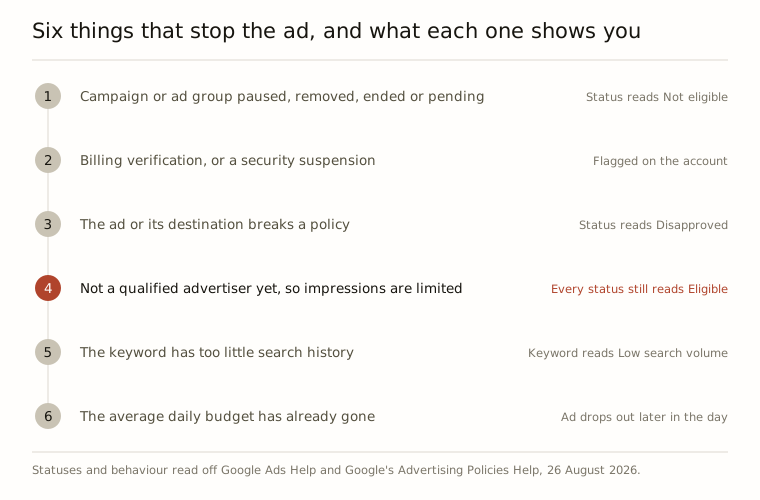
If the money is going out and the phone is not ringing, work through it in this order, because it finds the answer fastest. Is the campaign actually running. Can the account actually pay. Has the ad been approved. Has Google decided your account is trustworthy yet. Is anyone searching the words you bought. Has the day’s budget already gone. Five of those six say so somewhere in the account, in plain English, once you know which column to read. The fourth says nothing at all, and it is the one nobody writes about.
Read the status column before you change anything
The Status column on your Ads page is more specific than most people expect, and it is the fastest thing to read.
Not eligible means the ad is not serving because the campaign is paused, removed, ended or pending, or the ad group is paused, removed or incomplete. Something got switched off. Dull, and the most common answer there is.
Disapproved means the ad cannot run because its content or its destination breaks a policy. A disapproved ad receives no impressions, which is Google’s word for the number of times an ad gets shown, and you are told about the violation and what to do next.
Under review means the review has not finished. Google says most reviews are done within one business day, that some take longer, and that if an ad has been under review for more than two full business days you should check its status. More than a week is a support job.
Two things hide behind that column. You can add a Policy details column yourself, through the Columns icon, then Modify columns, then Attributes: it says why a disapproved ad is not eligible. And if you are running in Smart mode, Google’s own instruction is to switch to Expert mode for full policy information, which is worth reading twice if you set this up from inside your Business Profile.
One more, because it sits outside the campaign entirely. Ads will not serve while the account is going through billing verification, or while it is temporarily suspended over a security concern such as an account takeover. Neither of those will ever show up in a campaign, because neither is in the campaign.

Stop diagnosing it by searching for yourself
Everyone does this. You type your own service and your own town into Google, see no ad, and panic.
Google’s answer is the Ad preview and diagnosis tool, under Tools, then Troubleshooting. You give it a search term, a location and a device, and it tells you whether your ad is eligible to appear in that situation. Google’s own wording is that using the tool is preferable to doing the search yourself, because it avoids accumulating impressions and affecting your own figures. Searching for your own salon and never clicking is not a neutral act.
Two useful things from the same page. Your ad may stop appearing in the preview once the campaign has reached its average daily budget, which is an answer in itself. And where the tool says the reason is unknown, two common causes are a recent change of bidding strategy that the campaign is still calibrating to, and keywords with so little search history that they do not trigger the preview at all.

Approved everywhere, and still barely showing
This is the one the rest of the search results miss.
In August 2026 Google updated its Limited Ad Serving policy to cover all of Google Ads. Implementation is gradual, and Google says it completes by 2028. Inside the situations the policy covers, only advertisers Google counts as qualified serve without impression limits. Ads from advertisers it has not qualified are limited in impressions instead, and Google states plainly that the individual ads are not disapproved.
Read that twice, because it is the whole point: nothing turns red. Every column can say Eligible while the ads are being shown far less than you assumed. If a meaningful share of your impressions falls inside the policy, you get a notification in the account. If it does not, you get a quiet month and no explanation for it.
None of this is aimed at salons, and there is no published date for your account. It applies to every advertiser. But a new account, opened last month, for a business Google has never verified, is exactly the profile the policy describes.
The three signals you can actually move
Google publishes what it considers: account attributes, user activity and reports, account maturity, ad format usage, history of policy compliance, advertiser industry, and advertiser verification status. Three of those you can do something about this week. The rest are your account getting older and your ads being used.
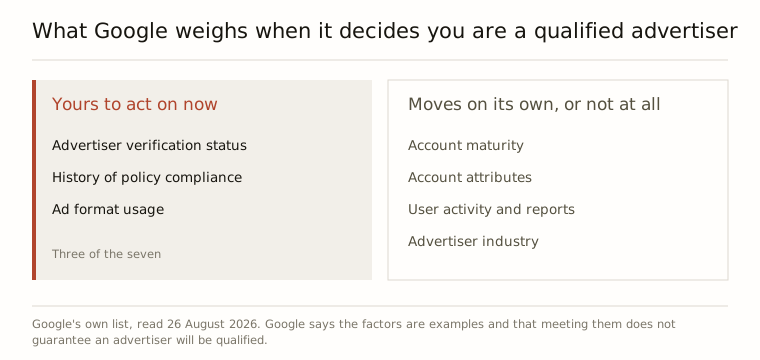
What Google says to do about it is short. Comply with the advertising policies, complete advertiser verification if your account is eligible for it, and keep building campaigns and creatives that earn positive engagement while the account is assessed. Google updates serving limits automatically as it reviews, and says openly that it cannot say how long that takes.
For search ads it also publishes best practices, and they are all about not being ambiguous over who you are. Keep your branding clear. Show your own brand in the ad and on the page the click lands on. Avoid generic wording in both. Pin your domain to the front of the headline if you are new or not well known. For a salon that is one sentence: the name above your door, the name in the ad and the name on the page should be the same name, spelt the same way.
Nobody is searching the words you bought
A keyword with very little or no search history gets the status Low search volume and goes inactive, so it triggers nothing. Before holding a keyword out of the auction, Google looks at how many people searched that term worldwide over the previous twelve months, and it rechecks regularly: if the searches pick up even slightly, the keyword comes back on its own. It has nothing to do with your bid or your ad text, so rewriting either changes nothing.
This is the most common self-inflicted version in a small local account. Balayage correction specialist plus the name of your village is how you think about the work. It can also be a phrase almost nobody types. Google’s own options are to wait, to broaden the match type, to make the keyword less specific, or to replace it using Keyword Planner. In a salon that usually means the service and the town, rather than the technique and the street.
Worth knowing in the same column: Eligible (limited all locations) means the ad cannot run in the places you targeted, because of policy restrictions and your targeting settings together.
When the budget is gone by lunchtime
An ad that shows at nine in the morning and not at three in the afternoon has not broken. It has run out. Google makes the same point from the other side in its note on the preview tool: your ad may stop appearing there once the campaign reaches its average daily budget.
Our position on this, said out loud because it costs us work: under about £100 a month of ad spend in a normal local market, we say no. A budget too thin to last the day does not only buy fewer clicks. It buys a month with too little in it to tell you anything, and that is the expensive part.
What we would do first
In order: read the Status column, check the account is not held up on billing or security, use the preview tool instead of Google, finish advertiser verification, make the name match in all three places, then ask whether the words you bought are words people type.
The free assessment takes about forty seconds and gives you your local search numbers and your Google listing’s faults before you have an account or a card. We fix the listing free before you pay anything. After that it is £15 to £149 a month depending on your ad spend band, no commission on bookings ever, 14 days free, cancel in one click. And the honest part: nobody can tell you which client came from which search, so we count calls, form enquiries and booking click-outs, and we say so.
Every claim above about Google’s own behaviour was read off Google’s help pages on 26 August 2026: the ad review process, checking the review status of an ad, the Ad preview and diagnosis tool, the Low search volume definition, and Google’s Advertising Policies note on the August 2026 update to the Limited Ad Serving policy.
Questions people ask
Can I run ads while my new page is still being built?
Not really. Google reviews the destination as well as the wording, and its own guidance says a page you are launching alongside the ad has to be complete before the ad can be reviewed. Finish the page first. If you need a start date, submit the ad several days early.
Should I keep editing the ad while it sits under review?
No. Google says changes to an ad or its assets restart the review process and may cause delays, so tinkering on day two puts you back at day one. If you want it approved but not live yet, pause the ad, ad group or campaign: paused ads are reviewed just like active ones.
Is Eligible (limited) the same as being limited by the new policy?
No, and it is worth knowing the difference. Eligible (limited) means the ad can run but not in every situation, because of restrictions on certain surfaces or for certain industries, and the Policy details column says why. The August 2026 impression limit changes no status at all.
What if I think an impression limit on my account is wrong?
Google notifies advertisers in the account when a meaningful share of their impressions falls inside the policy, and it does not disapprove the ads themselves. There is a Limited Ad Serving appeals form for challenging it. Google reinstates an advertiser once they qualify, and says it cannot say how long a review takes.
Do inactive keywords drag down the rest of the campaign?
Google says there is no negative impact from having low search volume keywords sitting in your account, though you may want to clear them out if you are bumping against your account limits. They are being held out of the auction, not held against you.