
Should your salon's ads run when you are closed?
Run them, with one exception, and before you change anything go and look at which setting you have already got. Since 1 June 2026 the standard advice has stopped being true for most campaigns: turning your ads off on the days you are shut no longer reduces what the month costs you, it just squeezes the same money into fewer days. Turning them off for certain hours of the day is a different setting, and that one still works the way you would expect. The exception is the campaign where nobody can act on an out of hours enquiry, and that is a problem with what the click lands on rather than with the clock.
The setting you may already have without choosing it
Google Ads campaigns start out showing ads “All day”, which means they are eligible to appear right through each calendar day (About Ad Scheduling). So if you have never been into the ad schedule, the answer to the question is that they are already running while you are closed.
There is one way that changes without you deciding it. On a Smart campaign, Google’s note is blunt: if you are using a Business Profile and have set store hours in your account, your campaign’s ad schedule automatically syncs to your store hours (Set an ad schedule for your Smart campaign). Plenty of salon campaigns were set up exactly that way, from inside the Business Profile, in five minutes flat. If that is you, your ads may already stop when you lock up and nobody chose it.
The same page gives three options: any time, business hours if the campaign is linked to a Business Profile, or custom hours you set yourself. Worth knowing before you touch any of them: once a schedule exists, your ads are only eligible during the times you listed, and will not show at the dates and times you left out (Set up an ad schedule).
Closing whole days no longer cuts your bill
This is the part the rest of the internet has not caught up with. On 1 June 2026 Google changed how daily budgets work with ad schedules. A campaign now paces towards the full monthly amount, 30.4 times your average daily budget, even when it runs on a reduced schedule, and the change applies specifically to schedules that turn campaigns off on certain days of the week (Changes to Google Ads budget pacing for Ad Scheduling).
Put your own numbers in it. Say you want to spend £300 a month, so you set a daily budget of £9.87 (300 ÷ 30.4). You are closed Sundays and Mondays, so five open days a week is about 21 open days in the month. Before June, that schedule would have paced towards about £207 (9.87 × 21). Now it paces towards the full £300, because 21 active days is past the 16 day line at which Google applies the 30.4 multiplier rather than doubling your daily budget.
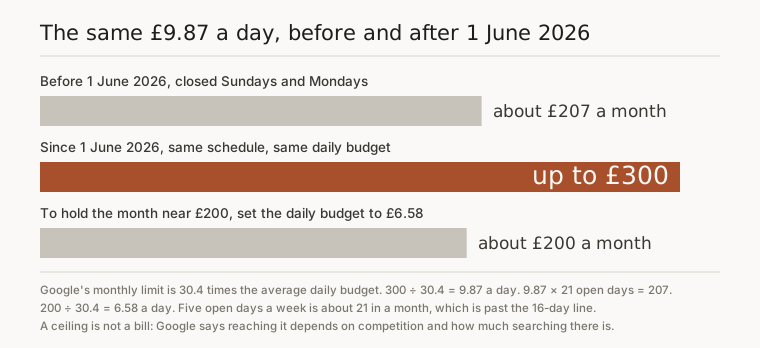
So if the reason you were going to switch the ads off on your days off was to keep the bill down, switch them off if you like, but change the daily budget as well. To hold the month near £200, set £6.58 a day (200 ÷ 30.4). Two limits have not moved: you will never be charged more than twice your daily budget in a day, or more than 30.4 times it in a month. And a ceiling is not a bill. Google is clear that whether a campaign gets anywhere near its maximum depends on things like competition and how much searching is actually going on.
Closing certain hours is a different setting
The June change is explicitly about whole days. Google says it does not affect schedules that turn campaigns off for specific hours within a day. So if you want the ads on from eight in the morning until nine at night and off overnight, that is the old arrangement, untouched, and every day stays active.
It matters less than it sounds, for a reason Google states on the same help page: if nobody searches for your keywords at the time or day you scheduled, your ads are not going to show. You are not quietly bleeding money into an empty three in the morning. There is nothing much to save there, and blocking those hours does guarantee you miss the one person who is looking.
One genuine exception, and it is the setup most salons are already on. The June pacing change does not apply to Local Services ads, Hotel Commission ads or Smart campaigns. If you are on Google’s own free Smart campaign, the older logic still holds, and its help page still says that restricting the ad to your opening hours means you do not pay for calls or clicks while the business is closed. Which advice is true for you depends on which kind of campaign you have, which is a sentence nobody else writing about ad schedules bothers with.

Your open hours are the hours you cannot pick up
Here is where the standard advice falls over for a salon specifically. Google’s stated reason for running ads only in business hours is so that you are free to handle customer enquiries, or can respond to calls in a timely manner. That is written for a business with somebody sat at a desk.
You are not at a desk. In a two or three chair salon the person who would answer the phone is the person with her hands in someone’s hair, wearing gloves, halfway through a root touch up. So the hours when the ad is allowed to run are close to the hours when a call has the least chance of being picked up, and the hours it is blocked are the ones where she is sitting on the sofa at nine at night deciding who to try in the morning. We have written separately about the bookings you lose when nobody can answer the phone.

What the out of hours click has to land on
Running ads while you are shut is only worth anything if the click reaches something that can take the enquiry without you. A phone number on its own at nine on a Sunday evening is a missed call, and a missed call is this whole objection dressed up as a scheduling question.
A form she can fill in, or a booking link she can press, works while the salon is dark. That is why a landing page with a form on it is part of what we set up rather than an extra, and it is also why clicks that never turn into calls are usually a problem with the destination rather than with the targeting. Fix where the click lands and most of the argument for blocking the evening goes away.
Read your own hours before you block any
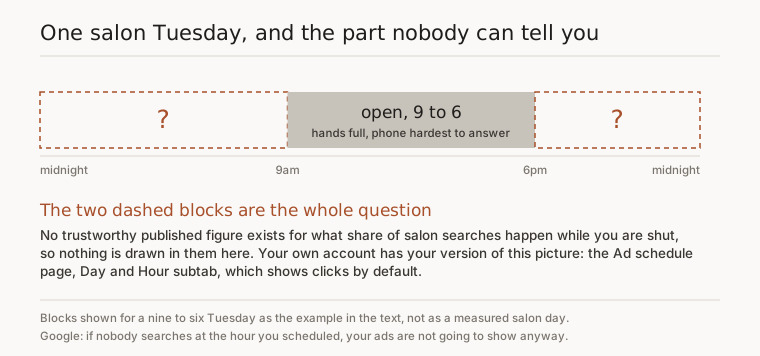
Nobody publishes a trustworthy figure for what share of salon searches happen after closing time, and you should be wary of anyone who quotes you one. Your own account has yours. The Ad schedule page shows a chart of the times your ads actually showed, defaulting to clicks, with subtabs for day and hour, day, or hour on its own.
Picture an ordinary nine to six Tuesday. The middle of it is the bit you know about. The two ends are the bit nobody can tell you.
Give it a month of real data before you cut anything out. Cutting hours in week one is deciding what your clients do before you have watched them do it.
What I would actually do
- Open the ad schedule and see what is set. If it says business hours and you never chose that, that is the store hours sync.
- Leave it running any time unless you have a specific reason not to.
- If the bill is the worry, change the daily budget. Since June, the schedule is not the lever.
- Make sure a click at nine at night lands on a form or a booking link, not just a phone number.
- After a month, read your own day and hour report, then decide.
If you would rather somebody else did all of that, the first thing we do is fix your Google listing, and that part is free before you pay anything.
Questions people ask
Do the ad hours follow my clock or Google's?
Ad schedules are set on your Google Ads account time zone, so check that setting before you trust the hours on screen. If the account was created on a different time zone, a schedule that looks like nine to six in the interface is not nine to six on your street.
Can I have the ads on in the evenings only?
Yes, but an overnight stretch needs two entries rather than one. Google's own example is Monday 23:00 to 0:00 plus Tuesday 0:00 to 7:00, because you need a schedule for each day it touches. Set one block per day, or the small hours quietly fall outside it.
How many separate time slots can one day have?
Six. Google allows a maximum of six ad schedules per day for each campaign, which is more than any salon needs. If you find yourself wanting three or four blocks in a day, the thing you are trying to fix is usually the budget or the landing page rather than the clock.
If I turn Sundays off, might Google run them anyway?
No. Google says campaigns never run on days you explicitly turn off with an ad schedule, and that part has not changed. What changed in June is only what the rest of the month paces towards, so Sunday stays dark and the money goes into the days that are left.
I am on Google's own Smart campaign, does the June change apply to me?
Google says the update does not affect the pacing behaviour of Smart campaigns, nor of Local Services or Hotel Commission ads. So on a Smart campaign the older logic still holds, and Google's help page still frames an opening-hours schedule as not paying for clicks while you are shut.