
Moving off a Google Smart Campaign without losing bookings

You cannot turn a Smart Campaign into a search campaign. There is no convert button, and nobody at Google is going to move it across for you. What you do instead is build the new campaign alongside the old one, switch it on, and pause the Smart Campaign the same day, in that order. Done that way there is never an afternoon where your salon has nothing running at all.
What follows is what actually changes, the order that protects the bookings you already have, and the twenty minutes a week that decides whether any of it was worth doing.
Nobody is switching your Smart Campaign off
If you have seen a headline about Smart Campaigns being retired, read it twice. Google’s own developer blog, checked today, says that from 23 September 2026 new Smart Campaigns can no longer be created through the Google Ads API, and that existing ones can still be updated and will keep serving ads.
The API is how other software talks to Google. It is not you, sitting at the reception desk with a laptop. Your campaign is not being turned off, and that date is not a deadline you have to beat.
So the reason to move is not panic, and anyone using that date to hurry you along is either confused or selling something. The reason to move is control, which is a smaller and much more useful reason.

What a keyword theme actually buys you
A Smart Campaign does not take keywords. It takes keyword themes, and Google is straight about what that means: one theme stands in for a lot of searches. Its own example is a bakery. The theme bakery makes the ad eligible to show for bakery near me, local bakery and cake shop. Google suggests seven to ten themes per campaign, each no longer than 20 characters.
For a bakery that is fine. Hair is a wider word than bread. Sitting right next to hairdresser and hair salon are courses, jobs, apprenticeships, models for training nights, cheap, box dye and wholesale, and a theme that is eligible for the searches you want is eligible for those too. That is how a small budget ends up buying clicks from people who were never going to sit in your chair.
You can push back inside a Smart Campaign. There are negative keyword themes, and a search terms report to add them from. But Google names two limits on the same page: too many negative themes and your ads reach fewer people, and negative keyword themes do not match close variants, so your ads can still show on close variations of the thing you just blocked.
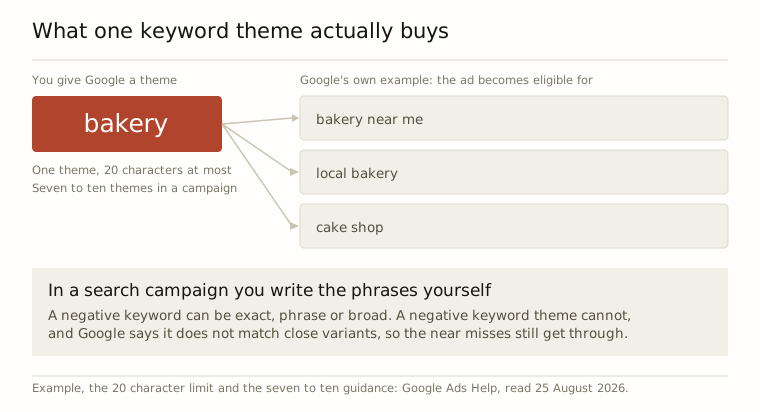
In a search campaign you write the phrases yourself, and a negative keyword can be exact, phrase or broad, so it blocks what you actually typed. That is the whole prize, and it is not more clicks. It is fewer wrong ones. Our own salon campaigns start with 536 time-wasting searches blocked before the first click: courses, jobs, apprenticeships, free models, cheap, DIY, wholesale.
The order that protects your bookings
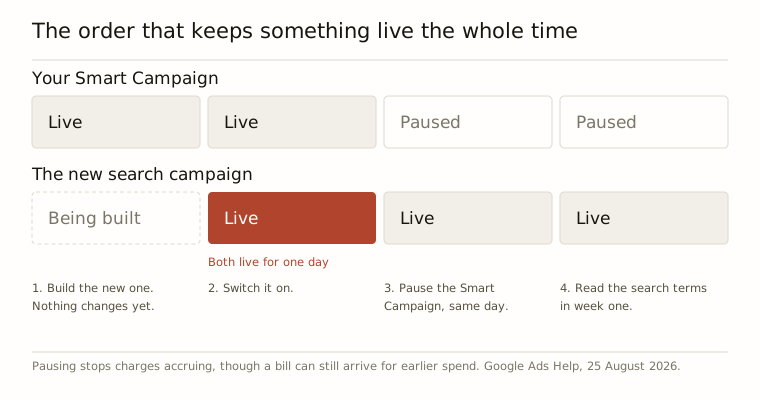
Four steps, and the order is the part people get wrong. Almost everyone pauses the old campaign first, because it feels tidy, and then spends four days building the new one with nothing live.
One. Build the new campaign and leave the Smart Campaign running. Smart Campaigns can only be created in Smart mode, and the other campaign types are offered to accounts that are not in Smart mode, so if all you can see is the simplified dashboard, the account has to be switched over before a search campaign appears as an option. Nothing about that switch stops the old campaign spending, and that is deliberate. Let it keep working.
Two. Write it properly before you switch it on. One campaign, split by the services you actually want more of. Your phrases, not themes. Your negatives in place on day one rather than after the first bad week. The postcodes you would genuinely travel to serve.
Three. Switch the new one on, then pause the Smart Campaign the same day. Not the week before, not the week after. While it is paused it stops accruing charges, though a bill can still turn up for spend from before you paused, which is normal and is not the campaign still running.
Four. Read the search terms report in week one. This is the twenty minutes that pays for the whole exercise. Every search that brought you a click and was never going to bring you a client becomes a negative keyword. Do it in week one, week two, week four, and then monthly.
The part that keeps working while you build
The ad is not the only thing bringing people through the door, and it is worth being clear about that before you touch anything. Your Google listing, the one with your opening hours and your photos and your reviews on it, is not part of the campaign. It does not pause when the campaign pauses. It is the thing I would fix first, whatever you decide about ads, because it works on the days you are not paying for anything. There is more on that in what happens to your bookings when you stop paying for ads.
One honest limit while you are comparing before and after. Nobody can tell you which client came from which search. We count calls, form enquiries and booking click-outs, and we say so plainly, because the booking platforms do not hand back the data that would let anyone claim more than that.
Doing it yourself, or handing it over
Doing it yourself is a Sunday afternoon for the build and twenty minutes a week for the search terms. The Sunday afternoon is the easy part. If you know the twenty minutes a week is not going to happen, that is the honest argument for paying somebody, not the fact that the interface is hard.
That is what we do: Google Ads built, run and tuned for hair salons, barbershops and chair renters, at £15 to £149 a month depending on your ad spend band, no commission on bookings ever, 14 days free and cancel in one click. Ten minutes of your time at the start, then nothing. There is a free assessment on this site that shows you your local search numbers and the faults on your Google listing before you have an account or hand over a card.
And if your weeks are already full, or you could not take fifteen more clients next month, do not do any of this. A campaign that brings work you cannot fit is a worse problem than the one you have now.
Questions people ask
Can I pause a Smart Campaign just for the quiet months?
Yes. Google offers two kinds of pause: one that runs until you resume it yourself, and a temporary one where you pick the dates and the campaign starts again on its own. Google suggests the temporary sort for seasonal businesses, which is a fair description of a lot of salons.
I paused mine and a bill still arrived, is that normal?
Yes. Google's help page says a paused campaign stops accruing charges, but you can still be billed for what it accrued while it was running. So the last few days of spend land after you press pause. Nothing has gone wrong and nothing is still running.
Should I run both campaigns for a fortnight to compare them?
I would not. Two live campaigns means two daily budgets chasing the same people in the same few postcodes, and you have one appointment book to fill. Switch the new one on, pause the old one that day, and judge the new one on its search terms report instead.
Is this worth doing on £60 a month?
Honestly, no. Below about £100 a month of ad spend we turn people away, because there is not enough money moving through it to learn anything and the wasted clicks hurt more. Sort your Google listing, get your rebooking right, and come back when the budget is there.