
Google Ads for a barbershop with no website

Yes, you can advertise on Google without a website. The trouble is that almost every page answering this question tells you to do it in a way that is about to stop working.
The standard advice is a call-only ad: no website, no landing page, just your number and a tap to ring it. Google’s own page on call ads now says that from February 2026 all options to create new call ads will be removed, and that from February 2027 existing call ads will stop receiving impressions. If you are setting up a barbershop campaign this week, that route is not there to take.
So the real question is not whether you can run ads without a website. It is where the click lands, and whether Google will let you show your phone number at all.
The advice that stopped working
The dates come off Google’s own page, About call ads, and today sits between them.
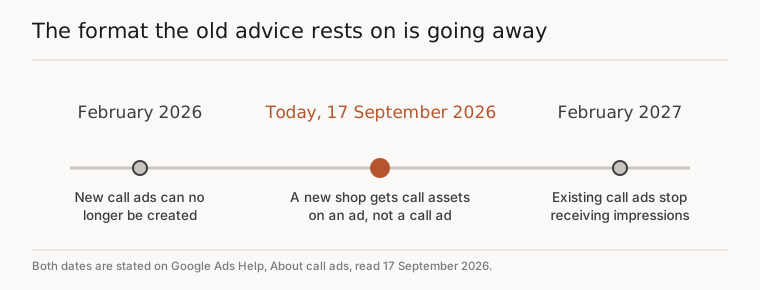
Google’s instruction on that page is to put your phone number on a responsive search ad as a call asset instead. That is not a worse deal. Its call assets page says they run on both Search campaigns and Smart campaigns, that you can set the number to appear only when your business can accept calls, and that a click on the call button costs the same as a click on your headline. Nobody charges you extra for a phone call.
The difference is structural, and it is the whole reason this got harder. A call-only ad was the destination. A call asset hangs off an ad that has one.
Where the click has to land
Google names two routes for a business with no website on its page about creating a website or landing page for your ads. One is to build a site with a builder, and it names Wix, Squarespace, GoDaddy, Google Sites, Shopify and WordPress. The other is to use your Google Business Profile as the destination, an option it calls Business Profile (optimized for your ad), which you can pick during the first step of signing up or use with Performance Max campaigns.
The same option exists on a Smart campaign. Google’s landing page guidance for those says the destination can be your website or your Business Profile, and that the Business Profile is a good option if your website is not ready yet. Its glossary is blunter still: businesses without a website can verify with Business Profile and advertise with Smart campaigns.
So it is real and it is free, and your listing is the one thing on Google you already own. Get it right first, whatever you decide about advertising, because it costs nothing and it works on its own. If yours is not showing up properly, we went through the usual causes in why your salon does not show up on Google Maps, and the same gates apply to a barbershop.
Two things are worth knowing before you settle on that route, though. It puts you in the campaign types where Google makes most of the decisions, which we wrote about in moving off a Google Smart Campaign. And it does not solve the next problem at all.
The catch is your phone number
Google will not take your word for your number. Both of the accepted ways of proving it are on its call assets page and in the unverified phone number policy.
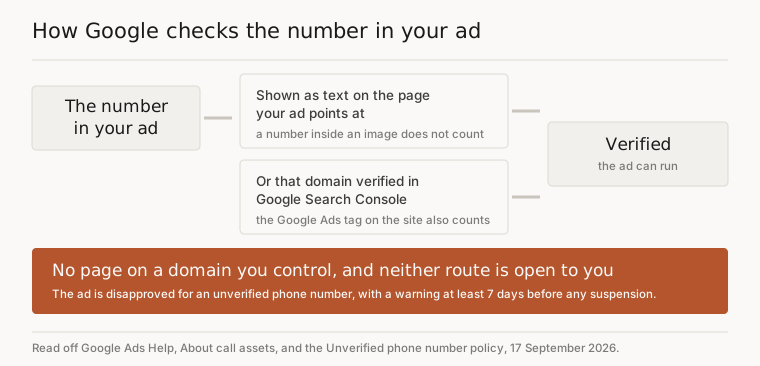
The call assets page says an ad will be disapproved for an unverified phone number if the number is not written strictly in the E.164 format, meaning no spaces, and that this exact number must be visible in your website’s source code, or your domain must be verified through Google Search Console. The policy page puts it from the other side: the number in your ad must be shown on the website included in the ad, it must appear as text rather than only inside an image, and the verification URL must be on the same domain as the ad’s display URL.
Read them together and the problem for a shop with no website is plain. Both routes assume a page, on a domain, that you control. If your whole presence is a listing and a phone, this is the step that stops you, and it stops you after you have built the campaign rather than before.
It is not a disaster if you get it wrong. The policy says a breach of this will not suspend an account without warning, and that a warning comes at least 7 days ahead. But a disapproved ad does not run, and an ad that does not run fills nobody’s Tuesday.

The order I would do it in
First, sort the Business Profile. It is free, it is yours, and it earns walk-ins whether or not you ever pay Google a penny.
Second, get a page the ad can point at, with your number on it as text. Not a whole site. One page.
Third, build the search campaign: real searches, the wrong ones blocked, and the number added as a call asset rather than typed into the ad.
Step two is the bit we do, so read this next paragraph knowing we are selling something. We give you a landing page on our domain carrying your shop, your services, your hours and your number in plain text, which is the page the ad points at. You do not buy a domain and you do not build a site. Then one campaign split by service, so a beard trim and a skin fade are not bidding against each other, and 536 time-wasting searches blocked before your first click, courses and jobs and apprenticeships among them. It is 15 to 149 pounds a month depending on what you spend on ads, no commission on bookings, 14 days free, and we fix your Google listing before you pay anything.
Two honest caveats. If you are spending under about 100 pounds a month on ads, we will tell you not to bother, because there is not enough in it for either of us. And the one named result we have is a salon, not a barbershop: Rachel Hartley at The Lockhouse, on 300 pounds a month, says it got her eight colour clients in the first month and that she did not touch a thing after signing up. That is one business, and it is not yours, which is exactly why the first step is the free one.

Doing it yourself instead
Perfectly sensible, and it is an afternoon rather than a project.
One page satisfies the rule. Take any of the builders Google names, put your number on it as text rather than inside your logo or a banner image, and make it the same number that goes in the ad. Google wants E.164 format in the page source, which for a UK number means the plus sign, 44, then your number without the leading zero and without spaces. If that sounds like a fiddle, the other accepted route is verifying the domain in Search Console and linking it to your Google Ads account.
Then add the number as a call asset rather than putting it in the ad text, and decide on purpose which hours it shows, because you can set it to appear only when calls get answered.
None of this is clever. It is just that the answer changed this year, and most of the internet has not noticed yet.
Questions people ask
Can I just type my phone number into the ad text instead?
Better not to. Google's call assets page says that if you try to include a phone number elsewhere in your ad text, it may lead to the ad being disapproved. The number belongs in a call asset, where Google can check it and where it becomes a tappable button rather than a line of text.
Will the call button show every time my ad appears?
No, and that is normal rather than a fault. Google says call assets do not appear with every impression: an algorithm decides at auction time whether to show them, based on past performance and other factors. Bid adjustments can make the call version show more often.
Can I use my mobile number rather than a landline?
Yes. Google allows standard and mobile numbers on call assets, along with toll-free ones. Vanity, premium rate and fax numbers are not accepted. Shared-cost or non-standard cost numbers are allowed but carry a note on the ad saying extra charges may apply, which is worth avoiding.
I have fixed the number, how long until the ad runs again?
Edit the ad or asset and save it, and Google re-reviews it automatically, typically within 24 to 48 hours. The Status column tells you where it is up to. If you think the disapproval was wrong, you can appeal it from inside the account instead of editing.
How will I know which calls came from the ad?
Turn on call reporting, which routes calls through a Google forwarding number so the account can count them. It works on the Search Network only. Our piece on the bookings you lose when nobody can answer the phone goes through what that report shows you.